
Share
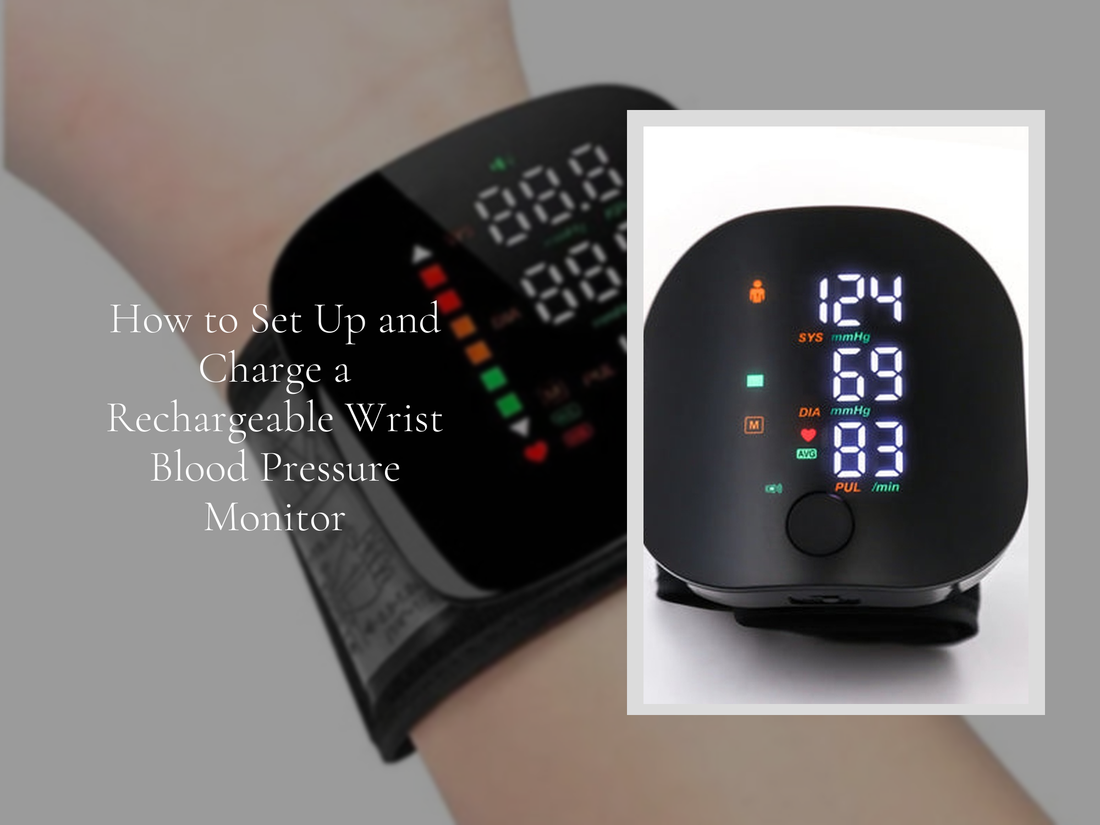
How to Set Up and Charge a Rechargeable Wrist Blood Pressure Monitor
Quick Answer: How to Charge a Wrist Blood Pressure Monitor
To charge a wrist blood pressure monitor, connect the included USB charging cable to the device’s charging port and plug the other end into a USB power source such as a wall adapter, laptop, or power bank. Most modern USB rechargeable wrist blood pressure monitors show a blinking or solid indicator light while charging and typically reach a full charge within 1–3 hours.
If your monitor uses replaceable batteries instead of a built-in rechargeable battery, simply open the battery compartment and install new AAA or AA batteries according to the polarity markings.
- Locate the USB charging port on the device
- Connect the USB cable securely
- Plug into a safe power source
- Wait until the charging indicator shows full charge
Just unboxed your wrist blood pressure monitor rechargeable? Learning how to charge and set up your device properly ensures accurate readings and longer battery life. Whether you're using a wrist blood pressure monitor with USB charging or a traditional battery-powered model, this guide explains everything step-by-step so you can start monitoring your blood pressure confidently.
Why Choose a Rechargeable Wrist Blood Pressure Monitor?
A wrist blood pressure monitor rechargeable offers convenience, portability, and simple USB charging. Compared with traditional upper-arm models, wrist monitors are lightweight and easier to carry for daily tracking.
- No need to constantly replace disposable batteries
- Compact design ideal for travel or quick home measurements
- Many models include memory storage and automatic inflation
For people who monitor blood pressure regularly, a rechargeable automatic wrist BP cuff provides a practical solution that fits easily into everyday routines.
Types of Wrist Blood Pressure Monitor Power Systems
Before charging your device, it helps to understand which type of power system your wrist blood pressure monitor uses. Most models fall into two categories: USB rechargeable monitors or traditional battery-powered units.
USB Rechargeable Wrist Blood Pressure Monitors
A USB rechargeable wrist blood pressure monitor includes a built-in lithium battery that can be recharged using a USB cable.
- Charged using a USB cable
- Usually fully charged within 1–3 hours
- Compatible with wall adapters, laptops, or power banks
- Often includes LED charging indicators
Battery-Powered BP Monitors (AAA / AA)
Some wrist BP monitors rely on replaceable AAA or AA batteries instead of rechargeable cells.
- No USB charging port
- Battery compartment on the back or underside
- Requires correct battery orientation
- Battery life may last several months depending on usage
Unboxing and What to Expect
When opening a new wrist blood pressure monitor, you will typically find a few essential components included in the box.
- The digital wrist BP monitor
- Adjustable wrist cuff (usually integrated)
- USB charging cable
- Quick-start guide or manual
- Carrying case (optional on select models)
Before using the device, review the included manual to learn about the monitor’s buttons, display indicators, and charging port location.
Step-by-Step: How to Charge a Wrist Blood Pressure Monitor
Charging a digital wrist blood pressure monitor is straightforward and typically takes only a few hours.
Step 1: Locate the Charging Port
Most modern monitors include a small USB charging port located on the side or bottom of the device. The port may be Micro-USB or USB-C depending on the model.
Step 2: Connect the USB Cable Correctly
Insert the USB cable firmly into the monitor’s charging port. Make sure the connector fits securely to ensure stable charging.
Step 3: Plug Into a Safe Power Source
Connect the other end of the cable to a reliable USB power source such as a wall adapter, laptop USB port, or power bank.
Step 4: Check the Charging Indicator
Most monitors include an LED light or display icon that shows the charging status. The light often blinks while charging and becomes solid once the battery is full.
Step 5: Wait Until Fully Charged
Allow the device to charge completely before first use. A full charge ensures stable performance and longer battery life.
Need help choosing a device with easy charging? Check out the Body Care and Health Devices collection for top-rated USB models.
How Long Does It Take to Charge a Wrist Blood Pressure Monitor?
Charging time depends on the battery size and charging method. Most wrist blood pressure monitor rechargeable devices reach full power within a few hours.
- Standard USB charging: 1–3 hours
- First-time charging: up to 3–4 hours
- USB-C fast charging models: about 1–2 hours
After a full charge, many monitors can perform dozens of measurements before needing to be recharged again.
Charging Indicators Explained
Digital blood pressure monitors use indicator lights or icons to show battery status while charging.
Solid Light
A solid light typically means the battery is fully charged and ready for use.
Blinking Light
A blinking light usually indicates that the device is currently charging. Leave it connected until the light becomes steady.
No Light
If no light appears, check that the charging cable is fully connected and the power source is working.
How to Replace Batteries in a Wrist BP Monitor
If your blood pressure monitor uses disposable batteries instead of a rechargeable battery, follow these steps to replace them safely.
- Locate the battery compartment on the back of the device.
- Open the battery cover carefully.
- Remove the old batteries.
- Insert new AAA or AA batteries according to the polarity markings.
- Close the compartment securely before turning the device on.
Always replace all batteries at the same time and avoid mixing old and new batteries to maintain consistent power and accurate readings.
How to Set Up and Use a Wrist Blood Pressure Monitor
Once the device is charged or new batteries are installed, you can set up your wrist monitor and take your first reading.
Attach the Wrist Cuff Properly
Wrap the cuff snugly around your wrist with the display facing upward. Position the cuff about 1–2 cm above the wrist joint.
Turn On and Start Measurement
Press the power or start button. The cuff will automatically inflate and begin measuring your blood pressure.
Position Your Wrist at Heart Level
For accurate results, keep your wrist at the same height as your heart while sitting comfortably and remaining still.
For a detailed tutorial, see our guide on how to use a wrist blood pressure monitor correctly.
USB Charging Best Practices
Your wrist blood pressure monitor with USB charging is designed for long-term use. Following these tips can help extend battery life.
- Use the original cable or a certified replacement.
- Avoid leaving the device plugged in after it reaches full charge.
- Store the monitor in a cool, dry place.
- Charge the battery every few months if the device is not used regularly.
Troubleshooting: Blood Pressure Monitor Not Charging
Check the Charging Cable
Ensure the USB cable is not damaged and is fully inserted into the monitor.
Inspect the Charging Port
Dust or debris inside the charging port can prevent proper connection. Gently clean the port if necessary.
Try a Different Power Source
Switch to another USB adapter, laptop port, or power bank to determine if the power source is the issue.
Reset the Device
If the monitor becomes unresponsive, hold the power button for several seconds to reset it.
If your device continues showing errors, read our guide explaining why blood pressure monitors sometimes display inaccurate readings.
Care and Maintenance Tips
Proper care helps your rechargeable BP monitor stay accurate and last longer.
- Clean the cuff gently with a damp cloth.
- Keep the device dry and away from direct sunlight.
- Store the monitor in its protective case when not in use.
- Avoid dropping the device or exposing it to extreme temperatures.
You can also learn how to store and travel with medical monitoring devices safely.
Frequently Asked Questions
How do I charge a digital blood pressure monitor?
Most digital wrist blood pressure monitors charge using a USB cable connected to a wall adapter, laptop, or power bank. Simply plug the cable into the charging port and wait until the indicator light shows a full charge.
Can I charge a BP machine with a phone charger?
Yes. Most USB rechargeable BP monitors can safely charge using a standard 5V phone charger or USB adapter.
How long does a wrist blood pressure monitor battery last?
A fully charged rechargeable monitor typically supports dozens of measurements before needing to be recharged again.
Why is my blood pressure monitor not charging?
Common causes include a loose cable, blocked charging port, faulty USB adapter, or depleted battery that requires several minutes of charging before indicators appear.
Recommended Collections
Ready to upgrade or explore more wellness tools? Browse these curated collections for quality health and lifestyle products:
Or head straight to our featured product: Rechargeable Wrist BP Monitor with LED Display.
Pillar Article: How to Use a Wrist Blood Pressure Monitor the Right Way (Step-by-Step)
Other Related Articles:
- Which Wrist Should You Use for Blood Pressure? Here's What Experts Say
- How to Get the Most Accurate Reading from Your Wrist BP Cuff
- How to Travel with a Blood Pressure Monitor (Without Damaging It)
- 5 Common Mistakes When Using a Wrist BP Monitor — and How to Avoid Them
Explore More:









2 comments
Thanks for sharing your experience. Please note that this article refers specifically to our rechargeable wrist blood pressure monitor model. Charging performance can vary between brands and models. If you’re using a different device, we recommend checking the manufacturer’s instructions. If you have questions about our product, we’re happy to help.
Although it monitors that it’s charging it isn’t left it 24 hrs but just speaks and dies