
A: Yes—smart posture correctors can improve posture awareness and reduce slouching by using vibration alerts and motion sensors that encourage real-time correction. When used consistently for short daily sessions (15–60 minutes), combined with ergonomic improvements and basic strengthening exercises, most desk workers notice reduced neck strain, better alignment, and improved posture habits within a few weeks.
Best Posture Corrector for Desk Workers 2026: Tested Smart Wearable Devices That Actually Help
Long hours at a desk often lead to rounded shoulders, forward head posture, and persistent neck and back tension. In 2026, the best posture corrector for desk workers is no longer just a rigid brace—it’s typically a smart wearable device designed to build awareness and improve posture habits throughout the workday.
Modern posture monitoring devices combine sensors, vibration alerts, and app-based tracking to help users correct slouching in real time. In this guide, we tested and compared the most effective posture correctors for office workers, remote professionals, programmers, and students.
⏱ 7 min read
Quick Comparison: Best Posture Correctors for Desk Workers (2026)
If you spend most of your day typing, attending virtual meetings, or working on a laptop, these were the top-performing posture correctors in our testing.
- Best Overall: Smart wearable posture trainer with vibration feedback and balanced comfort
- Best Smart Posture Corrector Wearable: Advanced sensor-based device with app tracking and analytics
- Best Budget Pick: Affordable posture reminder device with simple vibration alerts
- Best for Long Workdays: Lightweight wearable designed for extended all-day comfort
- Best Discreet Option: Low-profile posture sensor that remains hidden under clothing
Continue reading for detailed testing insights, comfort analysis, and recommendations based on different desk setups.
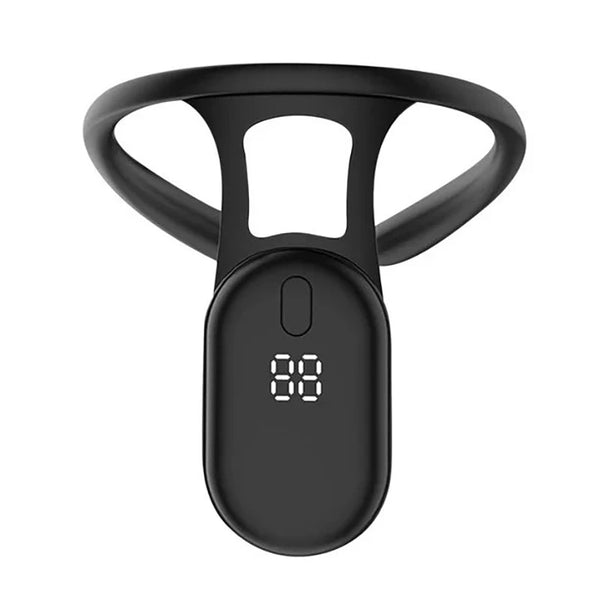
Smart posture correction starts with real-time feedback during your workday.
Our Testing Methodology for Desk-Worker Posture Correctors
How We Selected Products
We focused on wearable posture correctors, smart posture trainers, and posture reminder devices designed specifically for desk-based professionals and remote workers.
Real-World Desk Testing Process
Each device was tested during typical work activities such as typing, video calls, coding sessions, document editing, and long sitting periods.
Evaluation Criteria
- Posture detection accuracy and response time
- Comfort during extended 8-hour desk workdays
- Battery life and charging convenience
- Ease of setup and daily usability
- App features and posture analytics
- Notification effectiveness and distraction level
- Build quality and durability
- Overall value for money
Comfort During 8-Hour Workdays
Comfort was a critical factor. Devices that caused irritation, pressure points, or distraction during long sessions scored lower, even if they had advanced features.
Best Posture Correctors for Desk Workers in 2026
Below are the top-performing posture correctors based on real-world desk testing. We prioritized comfort, usability, and long-term habit formation over short-term correction.
Best Overall Wearable Posture Corrector
KentDO™ Smart Posture Corrector is the most balanced option for desk workers who want simple, effective posture reminders without complicated setup.
KentDO™ Smart Posture Corrector – Vibration Reminder Trainer
- Real-time vibration posture alerts
- Lightweight and discreet design
- Suitable for long desk sessions
- Easy daily use without app dependency
Best Smart Posture Corrector Wearable
Upright GO 3 remains a leading smart posture sensor with app-based analytics and detailed tracking insights for tech-focused users.
- Advanced posture tracking system
- Mobile app with progress insights
- Strong habit-building feedback loop
Best Budget Posture Reminder Device
Smartsense-style posture trainers offer basic vibration alerts at a lower cost, making them suitable for beginners.
Best for Remote Workers
App-connected posture devices help remote workers stay accountable without in-office posture cues.
Best for Long Sitting Sessions
Lightweight wearable sensors designed for comfort help reduce fatigue during extended workdays.
Best Traditional Brace Alternative
FlexGuard-style posture braces provide physical shoulder support for users who prefer structural correction over digital reminders.
Best for Tech Neck
Devices with frequent vibration reminders are most effective for reducing forward head posture caused by prolonged screen use.
Side-by-Side Comparison Table
| Model | Correction Type | Comfort & Material | Power / Battery | Best For |
|---|---|---|---|---|
| KentDO™ Smart Posture Corrector | Smart vibration reminder (sensor-based) | Lightweight ABS + TPR, discreet under clothing | Rechargeable | Desk workers, students, daily posture training |
| Upright GO 3 | Adhesive smart sensor with app feedback | Minimal form factor, no straps | Rechargeable (frequent charging) | Users wanting posture analytics |
| Backie Pro Flex | Physical posture harness | Reinforced brace support | No battery | Users needing strong alignment support |
Smart Posture Corrector vs Traditional Brace: Which Works Better?
Smart Wearable Posture Trainers
Smart posture correctors rely on sensors and vibration feedback to build awareness rather than forcing physical alignment. This encourages long-term habit formation during desk work.
Traditional Posture Braces
Traditional braces physically pull the shoulders backward, offering immediate correction but sometimes reducing comfort during long sessions.
Which Option Is Better for Desk Workers?
For most office workers, smart posture reminder devices provide better comfort and long-term adherence. Traditional braces are better suited for short-term correction or stronger physical support needs.
Do Posture Correctors Actually Work?
What Research Suggests
Posture interventions are most effective when they encourage awareness and behavioral change rather than forcing static alignment.
How Posture Reminder Devices Change Habits
Wearable devices create real-time feedback loops that help users recognize slouching patterns and gradually improve posture habits.
Limitations of Posture Correctors
No device can permanently fix posture alone. Lasting improvement requires ergonomic setup, movement breaks, and strengthening exercises.
Why Desk Workers Develop Poor Posture
Forward Head Posture and Tech Neck
Extended screen use causes the head to drift forward, increasing strain on neck and upper back muscles.
Long Typing Sessions
Continuous keyboard use encourages rounded shoulders and reduced upper-back engagement.
Laptop-Based Workstations
Laptops often position screens too low, forcing sustained neck flexion.
Prolonged Sitting and Muscle Fatigue
Muscle fatigue reduces posture control over time, making slouching more likely without external reminders.
What Is a Smart Posture Corrector and How Does It Work?
Posture Sensors Explained
Posture sensors detect upper-body positioning and identify slouching using motion tracking technology.
Vibration Feedback Systems
When posture deviates from set alignment, the device provides gentle vibration alerts to prompt correction.
AI and App-Based Posture Tracking
Some devices connect to mobile apps that track posture trends, duration, and improvement metrics over time.
Understanding Upright GO 3 Posture Technology
Upright GO 3 popularized adhesive posture sensors that attach to the upper back and provide immediate feedback during daily activities.
Which Posture Corrector Is Best for Your Work Setup?
For Programmers and Developers
Lightweight wearables are ideal for long uninterrupted coding sessions.
For Remote Workers
App-connected devices help maintain accountability while working independently at home.
For Hybrid Office Employees
Portable posture trainers are best for switching between multiple work environments.
For Standing Desk Users
Choose devices that accurately track posture in both sitting and standing positions.
How to Choose the Right Posture Corrector
Comfort and Wearability
Comfort determines long-term use, which is essential for results.
Battery Life and Charging
Long battery life improves consistency and reduces interruptions.
App Features and Analytics
Advanced apps provide posture insights and behavior tracking.
Sensor Accuracy
Accurate detection reduces false alerts and improves trust in the device.
Discretion Under Clothing
Many users prefer discreet devices that remain invisible during meetings.
Ergonomic Desk Setup Tips That Improve Results
Monitor Height
Keep the top of the screen at eye level to reduce neck strain.
Keyboard Position
Maintain neutral wrist alignment and keep elbows close to the body.
Chair Support
A supportive chair improves spinal alignment throughout the day.
Standing Desk Considerations
Alternating between sitting and standing reduces prolonged stress on posture muscles.
How Long Should You Wear a Posture Corrector?
Recommended Daily Usage
Start with 15–30 minutes per day and gradually increase usage as posture awareness improves.
Building Long-Term Habits
The goal is habit formation, not dependency on the device.
Common Mistakes to Avoid
- Overusing the device too early
- Ignoring workstation ergonomics
- Skipping strengthening exercises
- Expecting instant permanent correction
Exercises Desk Workers Should Combine With Posture Correctors
Shoulder Blade Squeezes
Sit upright and gently squeeze shoulder blades together for 10–15 reps.
Chest Opening Stretch
Open the chest by clasping hands behind the back and lifting gently.
Chin Tucks
Pull the chin backward to align the head over the spine.
Thoracic Extension Stretch
Lean gently backward to open the upper spine and reduce stiffness.
Real User Feedback & Long-Term Results
Common Success Stories
Users typically report improved posture awareness within 2–3 weeks of consistent use.
Typical Complaints
Some users mention alert fatigue, charging needs, or adjustment periods.
What Happens After 30–90 Days
Most long-term users see sustained posture improvement when combining devices with ergonomic changes.
Smart Posture Corrector Reviews: Popular Models Compared
Upright GO 3 Review
Upright GO 3 remains popular due to its adhesive design and strong posture tracking system.
Wearable Sensor Alternatives
Newer devices offer similar functionality with improved comfort and battery life.
Who Should Buy Each Device
Choice depends on whether users prioritize comfort, analytics, affordability, or simplicity.
Frequently Asked Questions About Smart Posture Correctors
How long should you wear a smart posture brace daily?
15–60 minutes daily is typically recommended depending on tolerance and posture goals.
Can posture correctors weaken back muscles?
No, when used correctly alongside exercises, they improve awareness rather than weaken muscles.
Are wearable posture reminder devices worth it?
Yes, they are effective for building posture awareness in desk-based environments.
Can you wear a posture corrector under office clothing?
Yes, most modern devices are designed to be discreet under clothing.
Do posture correctors permanently fix posture?
No, permanent improvement requires consistent habits, ergonomic setup, and exercise.
Is Upright GO 3 still worth buying?
Yes, it remains a strong option for users who want advanced posture analytics and app tracking.
What is the best wearable posture corrector for desk workers?
The best overall option is a smart wearable posture trainer that balances comfort, accuracy, and ease of use.
Pillar Article: 7 Posture Correcting Wearables Compared: Which One's Worth It?
Other Related Articles:
- The Truth About Posture Correctors: Do They Really Work?
- Does a Back Posture Corrector Work for You? Honest Review Roundup
- How to Wear a Posture Corrector: Mistakes That Kill Results
- Do Posture Correctors Work? Experts Test the Top 5 Picks
Explore More: