
Daily Eye Care Routine for Beginners: Reduce Screen Strain Fast
Modern life revolves around screens—laptops, phones, tablets, and TVs dominate most of our waking hours. While this digital convenience improves productivity and connectivity, it also introduces a widespread problem: Digital Eye Strain (also called Computer Vision Syndrome). If you often feel tired, dry, burning, or heavy eyes after long screen sessions, you are experiencing the early effects of this condition.
This guide is designed as a complete beginner-friendly daily eye care system. Instead of relying on quick fixes, you’ll learn a structured morning-to-night routine, practical habits, and supportive tools that help reduce eye fatigue, improve hydration, and restore visual comfort over time.
Whether you work in an office, study online, or simply spend hours on your phone, this routine will help you protect your eyes in a sustainable way.
What Is Digital Eye Strain and Why It Happens in Modern Screen Use

Digital Eye Strain is a condition caused by prolonged use of digital screens without adequate visual breaks. It is not a disease, but a group of symptoms triggered by overworked eye muscles, reduced blinking, and constant focusing at close distances.
When you stare at a screen, your blink rate drops significantly—sometimes by more than 50%. This leads to dryness, irritation, and fatigue. At the same time, your eye muscles remain locked in a near-focus position, which causes strain and discomfort.
Additional factors such as poor lighting, glare, blue light exposure, and incorrect posture can make symptoms worse.
Key symptoms beginners should recognize early
- Dry, irritated, or burning eyes
- Blurry vision after screen use
- Headaches around the forehead or temples
- Eye fatigue or heaviness
- Difficulty focusing on distant objects after screen time
If these symptoms appear daily, your eyes are signaling the need for a structured recovery routine rather than occasional rest.
Beginner-Friendly Daily Eye Care Routine (Full-Day Schedule)

A proper eye care routine works best when it is integrated throughout your day instead of being treated as a single action. Below is a simple yet effective structure you can follow from morning to night.
Morning eye reset routine (wake-up to first screen use)
When you wake up, your eyes are often dry due to reduced tear production during sleep. Start your day with hydration and gentle eye activation.
- Drink a glass of water immediately after waking
- Rub your palms together and gently cup your eyes for warmth
- Perform slow eye rotations (clockwise and counterclockwise)
- Avoid screens for at least 10–15 minutes after waking
This prepares your eyes for the visual demands of the day.
Midday screen protection system for office workers
The middle of the day is when eye strain peaks due to continuous screen exposure. This is where structured breaks matter most.
- Follow the 20-20-20 rule: every 20 minutes, look at something 20 feet away for 20 seconds
- Adjust screen brightness to match your environment
- Keep your monitor slightly below eye level
- Use artificial blinking every few minutes to maintain moisture
These micro-adjustments significantly reduce cumulative eye stress.
Evening recovery routine to reduce eye fatigue
Evening is when your eyes need recovery from the day’s visual load. This phase helps restore moisture balance and relax eye muscles.
- Reduce screen brightness or switch to night mode
- Take a 30–60 minute screen break before sleep
- Apply a warm compress over closed eyes
- Dim room lighting to reduce visual stimulation
Consistency in this routine helps your eyes recover faster overnight.
The 20-20-20 Rule Explained for Instant Eye Relief

The 20-20-20 rule is one of the simplest and most effective techniques for reducing digital eye strain.
It works by interrupting prolonged near-focus activity and allowing eye muscles to relax periodically. This prevents fatigue buildup and helps maintain natural blinking patterns.
“Regular visual breaks are as important as posture correction. The eyes are muscles too—they need rest cycles to function optimally.” — Optometrist-style recommendation for screen users
Best Habits for Healthy Eyes During Daily Screen Use
Beyond structured routines, long-term eye health depends on consistent habits. These small adjustments create significant improvements over time.
Blinking awareness and moisture protection
Most screen users blink less than normal, which leads to dryness. Conscious blinking helps distribute tears evenly across the eye surface.
- Practice intentional blinking every few minutes
- Avoid staring without breaks during focused tasks
- Use reminders or apps to prompt blinking habits
Screen brightness, contrast, and posture optimization
Environmental setup plays a major role in reducing eye strain.
- Match screen brightness with ambient lighting
- Reduce glare from windows or overhead lights
- Maintain at least an arm’s length distance from screens
- Sit with a neutral neck position to reduce tension
For deeper ergonomic support, explore our lifestyle collection designed for everyday comfort improvements.
How to Relieve Dry Eyes Caused by Long Screen Time

Dry eyes are one of the most common results of prolonged digital exposure. Addressing moisture imbalance is essential for comfort and clarity.
Artificial tears and hydration strategies
Hydration plays a central role in tear production. Drinking enough water and using lubricating solutions can help maintain moisture balance.
For persistent dryness, screen users often benefit from supportive devices that promote relaxation and reduce strain cycles.

Heated Eye Massager for Eye Strain & Deep Relaxation is designed to gently apply warmth and vibration around the eye area, helping relax eye muscles and support natural moisture circulation. It is especially helpful after long hours of screen exposure.
This type of device is commonly used as part of an evening recovery routine to reduce dryness and fatigue caused by digital strain.
Explore warmth & heat therapy collection for more relaxation-based wellness tools.
Eyelid hygiene routine for better moisture balance
- Clean eyelid edges gently with warm water
- Apply warm compress for 5–10 minutes
- Avoid rubbing eyes frequently
These habits support healthy tear film stability and reduce irritation over time.
Beginner Eye Massage and Relaxation Techniques

Eye massage techniques help release tension in surrounding muscles and improve blood flow. This is particularly useful for users experiencing heavy or tired eyes after screen use.
Step-by-step gentle eye massage routine
- Close your eyes and relax facial muscles
- Use fingertips to gently massage the temples in circular motion
- Lightly press under the brow bone area
- Repeat for 2–3 minutes without pressure
This routine can be done daily, especially during breaks or before sleep.
Screen Time Optimization Tools for Eye Protection

Managing screen exposure is one of the most effective long-term strategies for reducing eye strain. Digital tools and behavioral systems can significantly improve comfort.
Blue light filters and computer glasses
Blue light exposure can contribute to visual fatigue, especially in low-light environments. Many users adopt filtering tools or protective eyewear to reduce discomfort during extended screen sessions.
These tools are not a cure but act as supportive layers in a broader eye care routine.
Screen time management tools and apps
- Break reminder applications
- Screen time tracking tools
- Focus timers for structured work sessions
For more wellness solutions, explore our wellness & relaxation collection designed for daily comfort routines.
Nutrition for Long-Term Eye Health and Screen Users

Eye health is not only about external care but also internal nutrition. Certain nutrients support retinal health and tear production.
- Lutein and zeaxanthin: support visual clarity and protect against light stress
- Omega-3 fatty acids: help maintain tear stability and reduce dryness
- Antioxidants: support overall eye tissue health
Balanced nutrition combined with hydration improves long-term resilience against digital strain.
Travel-Friendly Eye Care Routine for On-the-Go Users

Travel often increases eye strain due to changing environments, air conditioning, and increased screen use. A simplified routine helps maintain comfort anywhere.
- Carry hydrating eye drops or mist
- Use sleep masks during flights or long rides
- Take screen breaks during travel downtime
Explore our eye care devices collection for portable solutions designed for mobility and convenience.
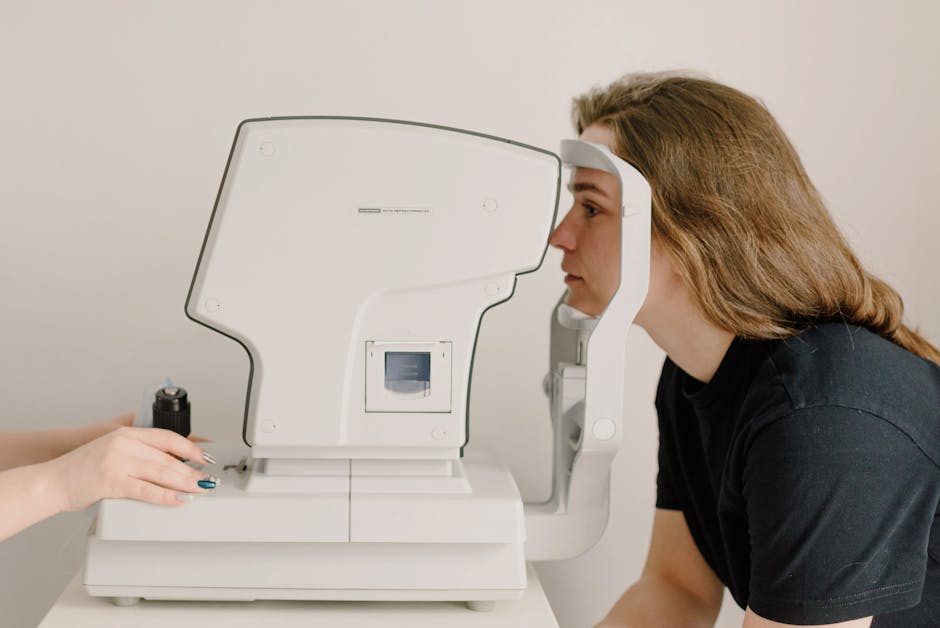
When to See an Optometrist for Persistent Eye Strain

If symptoms persist despite consistent routines, it may indicate underlying vision issues that require professional evaluation.
- Chronic headaches after screen use
- Persistent blurred vision
- Severe dryness or irritation
- Difficulty focusing even after rest
In such cases, an optometrist eye exam is recommended to rule out refractive errors or other eye conditions.
Comparison: Common Eye Care Methods for Beginners
| Method | Purpose | Effectiveness | Ease of Use |
| 20-20-20 Rule | Reduces eye muscle fatigue | High | Very Easy |
| Warm Compress | Relieves dryness | High | Easy |
| Eye Massage | Releases tension | Medium | Easy |
| Screen Break Apps | Controls usage habits | Medium | Very Easy |
FAQ
What is the best daily eye care routine for beginners?
A simple routine includes hydration in the morning, the 20-20-20 rule during screen use, and a warm compress or relaxation technique in the evening.
How can I reduce eye strain from computer screens?
Take regular breaks, adjust screen brightness, blink more often, and maintain proper posture and distance from the screen.
Why do my eyes feel tired every day when using screens?
This is usually caused by reduced blinking, constant near-focus, and prolonged exposure to digital screens without rest breaks.
What are the best habits for healthy eyesight during screen use?
Consistent blinking, screen breaks, proper lighting, hydration, and limiting continuous screen exposure are key habits.
How do I relieve dry eyes caused by long screen time?
Use warm compresses, maintain hydration, take screen breaks, and support eye relaxation with gentle massage techniques.
Conclusion
Building a daily eye care routine is one of the most effective ways to reduce modern screen-related discomfort. By combining structured habits like the 20-20-20 rule, hydration, proper screen ergonomics, and recovery techniques, you can significantly reduce Digital Eye Strain over time.
The key is consistency. Small daily actions create long-term improvements in comfort, clarity, and visual endurance.
Start with one or two habits today and gradually build your full routine for lasting eye wellness.
Pillar Article: How to Prevent Eye Strain: A Complete Digital Screen Protection System